


AI Video Editor - VivaCut
4.315.05K Reviews
App Specs
- Version
- 4.5.0
- Updated On
- License
- Free
- Downloads
- 100,000,000+
- Developer
- VivaCut professional video editor
- Categories
- Video Players & Editors
- Platform
- Android, iOS
Screenshots
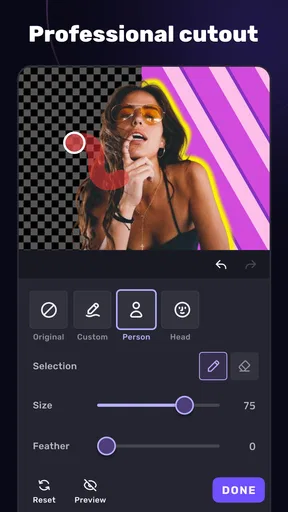
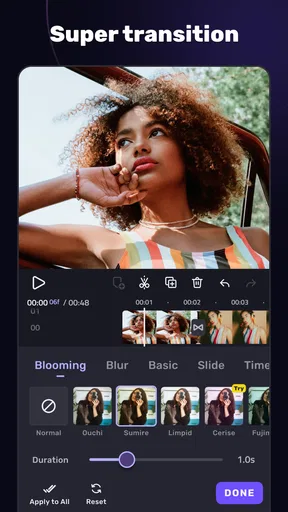
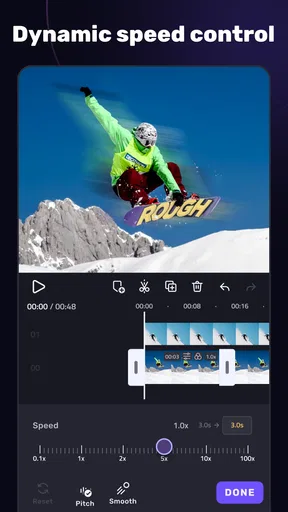
 Analysis by AppCompare
When several people share one phone or tablet, video editing stops being a purely individual hobby. Someone wants to trim a school performance, another person needs a quick clip for a group chat, and the device still has to be available for everyday tasks. I find AI Video Editor - VivaCut interesting in that setting because it offers room for hands-on editing without requiring a desktop workflow. The key is to treat it as a shared creative tool, not as a shared account or an automatic family organizer.
One device, different kinds of videos
A realistic household use might begin with a relative filming a birthday dinner and asking for a short, watchable recap before everyone leaves. In VivaCut, the person editing can trim away the camera shake at the start, choose the most useful moments, arrange clips into a sensible order, and add music if it suits the mood. That is a more practical goal than trying to make every casual recording look like a film trailer.
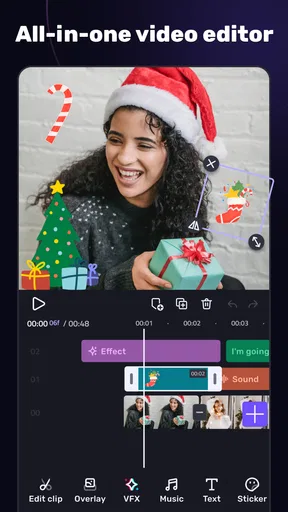
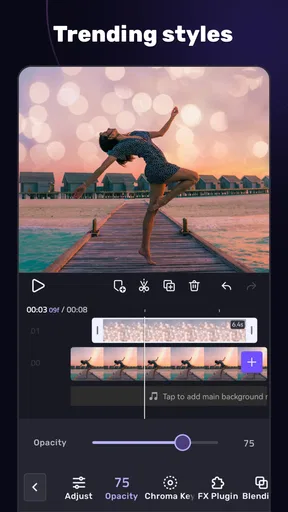
The app’s multi-layer editing can be useful when a simple sequence is not enough: for example, a title or visual element can sit over the footage rather than replacing it. Chroma key is another tool with a specific purpose, not a shortcut that improves every clip. I would use it when the subject was filmed against a suitable background and I wanted to replace that background; for ordinary family footage, clean trimming and a steady sequence are usually more valuable.
Guides and Analysis on AI Video Editor - VivaCut
This makes the app a better fit for households where at least one person enjoys experimenting. Someone who only wants to crop a clip and send it immediately may find the extra editing choices unnecessary. For that quick job, a phone’s built-in editor can be more direct; VivaCut earns its place when the editor wants more control over layers, effects, timing, or the overall feel.
Keep projects and account choices deliberate
On a shared device, I would decide who is editing before opening a project and avoid treating the app as a common drop box. A project can contain personal footage, unfinished edits, and creative choices that another person may not want changed. Agreeing on a simple rule—such as asking before editing or removing someone else’s work—prevents the ordinary household confusion of not knowing which version is current.
It also helps to make a copy of important source footage before experimenting. That is a sensible habit in any editor: effects, trims, and rearrangements are creative decisions, and keeping the original gives you a way back if the edit does not work. For a collaborative clip, one person can take responsibility for assembling the sequence while others choose moments or suggest music, rather than several people making competing edits on the same device.
VivaCut is free to install, but it also offers in-app purchases priced from $0.99 to $79.99 per item. I would begin with the free experience and only consider paying after identifying a specific limitation that affects a project. That is especially useful in a household, where one person’s interest in premium effects may not be shared by everyone. Check the purchase choice with whoever manages spending on the device before confirming anything.
Worth Reading Before You Choose

Basketball Stars: Multiplayer Is Fast, but Can It Recover When Matches Go Wrong?

WEBTOON Turns Phone Updates Into a Better Reading Routine

Link to Windows Runs on Shared Habits, Not Social Feeds

How Alibaba.com Dominates the B2B Marketplace

Metro's Quiet Rise: Redefining Mobile Communication

Harnessing Ecosystem Power with Phone Tracker by Number
Planning edits around real life
Mobile editing is most rewarding when the goal is clear. Before opening the timeline, I would decide whether the finished video is meant to preserve a memory, explain something, or catch attention in a social feed. That decision helps keep the edit focused: a personal recap may need natural sound and a few longer shots, while a short social clip may benefit from a quicker pace and a more deliberate opening.
A useful workflow is to pick the best footage first, then trim and arrange it, and only afterward try music, effects, or layered elements. This order keeps decoration from hiding weak choices in the underlying clips. If an effect makes a moment harder to understand, remove it; a clean edit often feels more polished than one that uses every available option.
For music, I would listen to the finished sequence with the chosen track rather than selecting a song solely because it sounds appealing on its own. The rhythm can help guide cuts, but it can also overpower voices or the atmosphere of an event. If the words people are saying matter, keep the soundtrack restrained or rely more on the original audio. VivaCut lets you add your own music as well as use its music library, giving you a choice of workflow rather than forcing every project into one sound.
What to expect from the editing experience
VivaCut is a video editor in the Video Players & Editors category, developed by VivaCut professional video editor. It has a 4.3 average from around 1.4 million ratings, and it has been installed over 100 million times. Those figures suggest it has found a broad audience, but they do not tell me whether its layered workflow will suit a particular person. I would judge that by trying a small project, not by assuming that popularity means every tool will feel effortless.
The app is rated for Everyone and is available for devices running Android 7.0 or later; its current version is 4.4.5. An age label is useful context, but it is not a substitute for household rules about filming, sharing, or spending. I would talk with younger users about getting permission before posting other people’s faces or private moments, and about checking where a clip will be shared before exporting it.
For comparisons, I think of the usual alternatives in two groups. A built-in phone editor is often the better choice for a fast trim with almost no setup. A desktop video editor is generally more comfortable when a project needs sustained, detailed work across a larger screen. VivaCut sits between those options: it brings more creative control than a basic phone editor while keeping the work on a mobile device. That balance is appealing, but a small screen and a crowded timeline can make precise adjustments feel fiddly, especially on a device being passed between people.
Who will get the most from it?
I would recommend VivaCut to someone who regularly turns phone footage into short, considered videos and wants more than a few automatic edits. It is particularly useful for a beginner who is ready to learn how layers, timing, music, and effects work, but who does not want to start with a desktop program. More experienced mobile editors may also appreciate having multi-layer tools and chroma key available for projects that call for them.
I would steer away from it if your main requirement is one-tap cleanup, if you dislike adjusting edits on a touchscreen, or if you need a carefully managed collaborative workspace for multiple people. It is also not the best fit for a household that expects every user to have a clearly separated private area inside the same app. In those situations, a simpler editor—or a dedicated desktop workflow for larger projects—may be less frustrating.
Getting Started with VivaCut
First things first, downloading VivaCut is a breeze. Whether you’re on Android or iOS, it’s just a tap away. Once it's installed, you’re greeted with a sleek, user-friendly interface that doesn’t overwhelm you with too many options right away. Trust me, I’ve tried apps that felt like navigating a spaceship. VivaCut, however, keeps it simple and intuitive.
Features That Stand Out
Now, let’s talk features. This app is packed with goodies. From basic trimming and cutting to advanced features like chroma key and multi-layer editing, VivaCut has it all. The standout for me? The AI-powered features. These tools simplify complex edits, turning tedious tasks into a few simple taps. Imagine creating professional-grade transitions or applying cinematic color grading without breaking a sweat. It’s magic!
And let’s not forget about the music library. VivaCut offers a wide selection of tracks to give your videos that extra oomph. Plus, the app allows you to add your own music, giving you complete creative control.
User Experience
Let’s chat about the user experience. Navigating the app feels smooth, like butter. Each tool is easily accessible, and the app doesn’t lag or crash, which is a huge plus. The learning curve? Surprisingly shallow. Even if you’re a complete newbie, you’ll find yourself editing like a pro in no time. The app provides helpful tutorials and tips to get you started, which is perfect if you’re diving into video editing for the first time.
For a first project, I would keep the scope modest: assemble a few clips, make the cuts easy to follow, and add only one or two finishing touches. That gives you a chance to learn the timeline before juggling layers and effects. Tutorials can help with the first steps, but the most useful learning often comes from making a small edit, watching it back, and noticing where the pacing feels off.
One trade-off with a feature-rich mobile editor is that choice can slow down a quick job. When I am editing casually, I try not to browse effects until the clip sequence already works. Otherwise it is easy to spend time comparing looks without improving the story. The app’s creative range is a strength, but it rewards a little restraint and a clear purpose.
Exporting and Sharing
Once you’ve created your masterpiece, exporting is a cinch. VivaCut supports various resolutions, including 4K, so your videos look sharp and professional. Sharing your creations to social media platforms is seamless, making it easier than ever to showcase your work to friends, family, or followers.
Before exporting, I would watch the full edit once with the sound on and once with the sound low or muted. The first pass catches music or dialogue that feels unbalanced; the second shows whether the sequence still makes sense without relying on audio. For household clips, this is also a good moment to check that no private conversation, address, or unintended background detail made it into the finished version.
Resolution is not the only consideration when choosing an export. A high-resolution file can be useful when image detail matters, but it may be more than a quick message or casual social post needs. I would match the export choice to where the video is going and how it will be watched, then keep a copy of an important finished edit somewhere appropriate before clearing space or moving on to another project.
Monetization and Premium Options
While the free version of VivaCut offers a ton of functionality, opting for the premium version unlocks even more features. You get access to exclusive effects, ad-free editing, and more export options. If you’re serious about your video content, investing in the premium version is definitely worth considering.
For a family or shared device, I would treat that as an individual decision rather than an automatic upgrade. A person who edits often may value the additional options; someone making the occasional birthday montage may be perfectly happy starting free. Since purchase items range from under a dollar to nearly eighty dollars, it is worth reading the in-app purchase prompt carefully and making sure the person paying understands what is being selected.
I would also avoid paying just because a project feels unfinished. First identify what is actually missing: perhaps a particular effect, an export choice, or simply more time to refine the cut. If the free tools already cover the intended result, there is no reason to turn a casual editing habit into a recurring expense. If a paid option genuinely removes a barrier in work you do often, then the value is easier to judge.
Final Thoughts
All in all, AI Video Editor - VivaCut is a powerhouse in the world of mobile video editing. It combines ease of use with advanced features, making it suitable for everyone from beginners to seasoned editors. Whether you’re editing a quick clip for social media or crafting a detailed project, VivaCut has the tools you need to bring your vision to life. So, go ahead, download the app, and start creating!
My household verdict is that VivaCut works best when one person takes ownership of an edit and everyone else contributes with clear permission and expectations. It can turn ordinary phone footage into a more deliberate video, and its layers and effects give curious editors room to grow. It is less suited to people who want a fully automatic result, a basic trim with no learning, or a shared private workspace. Start with a small project, keep the original footage, and decide on any purchase only after you know what you want the app to do.
Pros
- Intuitive user interface for easy navigation.
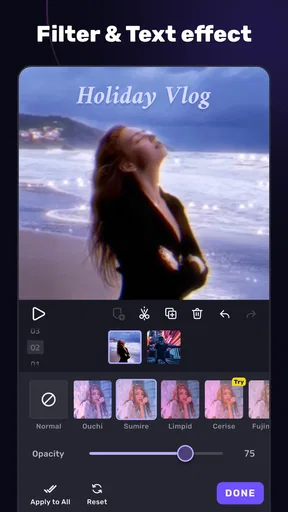
- Wide range of video effects available.
- Supports multiple video formats.
- Offers high-resolution video exporting.
- Regular updates with new features.
Cons
- Contains ads in the free version.
- Some features require in-app purchases.
- Can be resource-intensive on older devices.
- Limited audio editing tools.
- Occasional crashes during video export.
FAQs for AI Video Editor - VivaCut
What features does VivaCut offer for video editing?
VivaCut provides a range of professional video editing features, including multi-layer editing, chroma key for background removal, and keyframe animations. Users can also adjust brightness, contrast, and saturation, apply dynamic transitions, and use the advanced text editor for subtitles or captions, making it suitable for both beginners and experienced editors.
Is VivaCut suitable for beginners in video editing?
Yes, VivaCut is designed to be user-friendly for beginners while offering advanced features for professional editors. The intuitive interface and easy-to-follow tutorials make it accessible for users who are new to video editing, allowing them to create polished videos without a steep learning curve.
Are there any in-app purchases or subscriptions in VivaCut?
VivaCut offers a free version with basic features, but to unlock advanced tools and remove watermarks, users can opt for a subscription. The premium version provides access to additional effects, transitions, and an ad-free experience. It's advisable to review the pricing details in the app store before purchasing.
Can VivaCut handle high-resolution video exports?
Yes, VivaCut supports exporting videos in HD, Full HD, and even 4K resolutions, ensuring that your creations maintain high quality. This makes it an excellent choice for content creators who require crisp and clear video outputs, suitable for social media or professional use.
Does VivaCut offer customer support or tutorials?
VivaCut provides various resources to help users, including in-app tutorials, a help center, and customer support to address any issues. Users can access instructional videos and FAQs within the app, and for more personalized assistance, they can reach out to the support team through the app or the official website.


